Chat and models
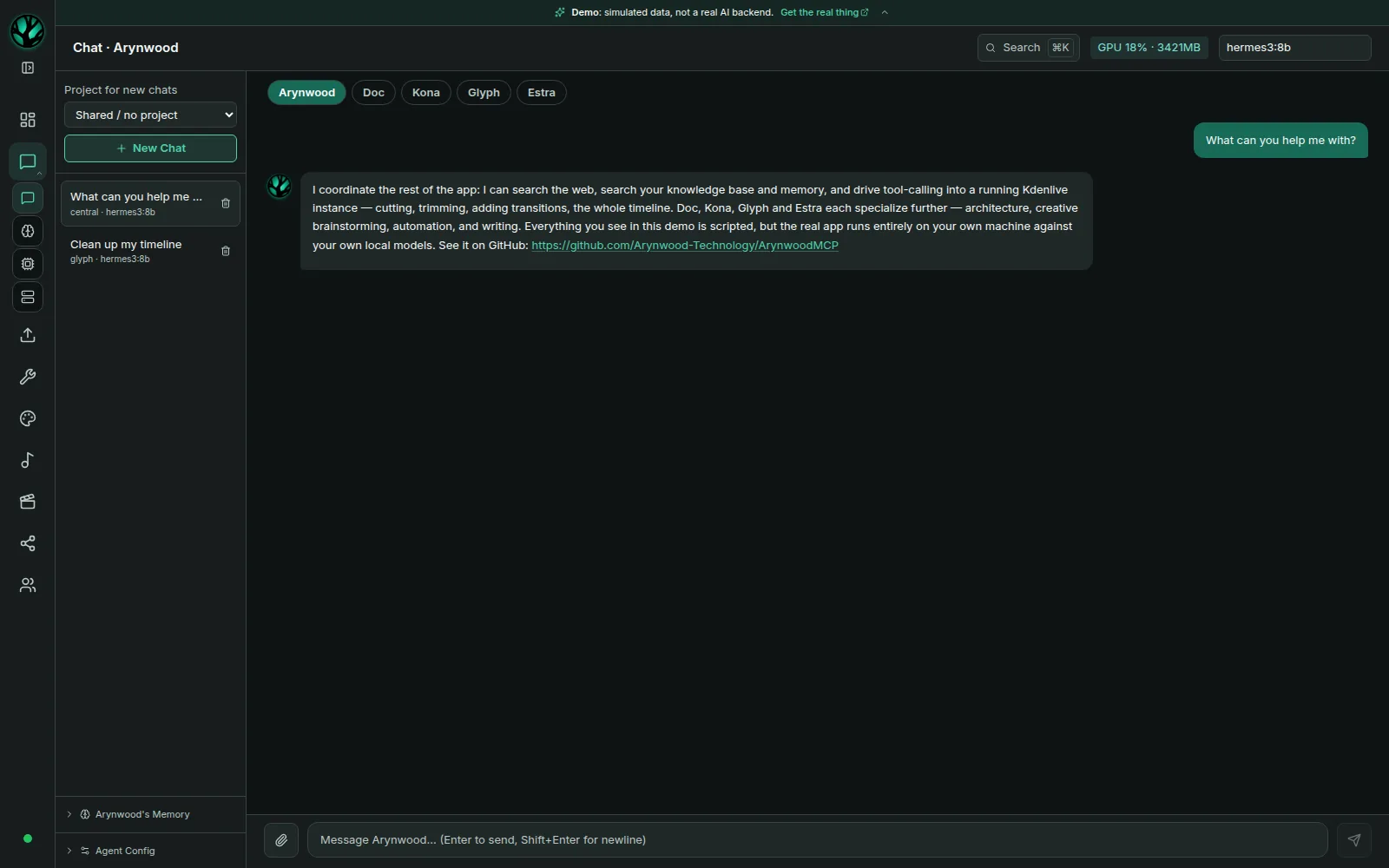
Multi-persona chat that streams from Ollama. Browse, pull and delete models, and register local or remote Ollama and OpenAI-compatible servers.

Personal AI · Linux and Windows desktop alpha
A personal AI that runs on your own machine.
Released October 10, 2026
The latest release makes Community work with a Grove on a server and every page readable, with security updates. Community inside the app, update notices, CPU mode, chat and image endpoints, and the October 9 MCP hardening are included.
Still a single-owner desktop alpha, without an OS sandbox or enforced offline mode. Windows is unsigned; clean-machine installation and optional Windows integrations remain unverified. Read the full release notes and updated security brief.
Linux AppImage · Debian/Ubuntu .deb · Windows x64 installer
Verify downloads with Linux checksums or Windows checksums. Models and supporting services are installed separately.
What’s inside
Start with Ollama chat, then add the services your workflow needs. Models and supporting services are installed separately.
Multi-persona chat that streams from Ollama. Browse, pull and delete models, and register local or remote Ollama and OpenAI-compatible servers.
Teach it from a URL, a file or pasted text, then search your own documents. Uses Qdrant and an Ollama embedding model.
A canvas design tool. Image generation connects to a separately installed A1111 service.
Optional music and audio tools through separately installed MusicStudio sidecars.
Model Context Protocol tool servers, including Kdenlive editing through Cutroom’s MCP server. Each tool server is configured separately.
A Ctrl+K command palette and a system status drawer on every screen, with live service health on the dashboard.
Experimental
Off by default and run from a source checkout; the desktop packages don’t include it. It answers only you.
A background service you start yourself keeps your conversation going, and picks up where it left off after a restart.
Your agent can use a tool, read the result and choose the next step until the job is done. Anything that deletes or publishes waits for your approval, and is refused when nobody is there to approve it.
Facts you tell it are written to a plain MEMORY.md file and dated notes on your disk, and it remembers them after a restart. Only your own messages read or write it.
Talk to your agent from any IRC app, through your own IRC server. It answers only your services account, not your nickname, and ignores everyone else.
Arynwood checks GitHub for a newer stable release at startup and every six hours while open. The check sends no credentials or workspace content; GitHub receives normal connection metadata, including your IP address. There is no telemetry. Other data goes out through features you use: web search, learning from a URL, downloads, social publishing, deploys, IRC, a Grove on a server when you use Community, or a remote model server you add. The security notes list what is protected and what isn’t yet.
Requirements
From the project documentation. Read the platform requirements and the Windows setup notes.
| Operating system | Linux x86_64: AppImage or Debian/Ubuntu .deb. Windows x64 (alpha): a per-user installer; WebView2 is required and the installer downloads it if needed. macOS is not supported. |
|---|---|
| Memory | 16 GB RAM minimum in the project documentation. Model size affects memory use. |
| Storage | At least 20 GB free, plus space for models and generated media. |
| Chat GPU | Optional. Ollama can run chat on a CPU, more slowly. See measured CPU speeds. |
| Creative GPU tools | An NVIDIA GPU for the documented GPU services. At least 12 GB VRAM is the project’s practical recommendation. On Windows, these tools need their own Windows setup and haven’t been validated yet. |
Get started
Get chat working first, then add knowledge search and creative tools one at a time.
Step 01
Get the package for your system from the v0.5.0 release. On Linux, check the AppImage or .deb against SHA256SUMS.txt, then make the AppImage executable or install the .deb with its GStreamer packages. On Windows, check the setup .exe against SHA256SUMS-windows.txt and run it. The installer is unsigned, so Windows may warn you first.
Step 02
Ollama isn’t bundled. Install it, then pull a model that fits your RAM or GPU memory. A 3B model is comfortable on a CPU alone.
Step 03
Pick the model and send a message. Once that works, add Qdrant and an embedding model for knowledge search, then any creative services.
# Linux: install Ollama
curl -fsSL https://ollama.com/install.sh | sh
# Windows: run the installer from https://ollama.com/download/windows

# Then, in a terminal or PowerShell, pull a starter model
ollama pull llama3.2:3bQuestions
What it includes, what it needs, and what stays on your machine.
Arynwood MCP is a local-first AI workspace and personal AI agent for Linux and Windows. It runs language models on your own machine through Ollama and adds document search, memory, a design canvas and MCP tool integrations. The current release is the v0.5.0 desktop alpha.
Arynwood checks GitHub for a newer stable release at startup and every six hours while open. The check sends no credentials or workspace content; GitHub receives normal connection metadata, including your IP address. There is no telemetry. Your chats, documents and memory stay on your disk, and the models run on your computer through Ollama. Other data leaves through features you use: web search, learning from a URL, downloading models and tools, social publishing, deploying to your server, IRC, a Grove on a server when you use Community, or a remote model server you add. There is no enforced offline mode, so the security notes list what is protected and what isn’t yet.
Local chat, document search and memory can work without an internet connection once the models are downloaded. Arynwood has no enforced offline mode. Automatic update checks, downloads, web search, remote model servers and social publishing use the network when available. Failed update checks stay quiet.
Only experimentally. The headless gateway, which is off by default and runs from a source checkout, lets you message your own home agent from any IRC app on your phone, through your own IRC server. It answers only your services account and ignores everyone else. The model and your memory stay on your home machine; only the chat messages travel, encrypted with TLS.
No. The download contains the interface and backend. Ollama and its models are installed separately, and so are Qdrant, A1111 and MusicStudio if you use those features.
Yes, as an alpha. Version 0.5.0 includes a Windows x64 installer with the backend bundled. It is unsigned, and clean-machine installs, microphone and camera capture, downloads and the optional integrations still need testing. As on Linux, Ollama and Qdrant are installed separately. App data is kept in %LOCALAPPDATA%\arynwood-mcp and survives upgrades. Read the Windows setup notes.
Yes. The browser demo runs the real interface with scripted conversations. It is not a live AI; features that need a GPU or backend say so.
Chat can run on a CPU through Ollama. On a 2012 8-core Xeon with no GPU, a 3B model generated about 13 tokens per second, faster than most people read. See the full CPU benchmark. GPU generation features have separate NVIDIA requirements.
Hermes 3 8B by default, chosen by measurement. On a 12 GB RTX 3060 it made 27 of Arynwood MCP’s 30 routing decisions in 0.12 seconds each and followed no instruction planted in a tool result. See how seven models compared.
Its source code is public on GitHub under the Arynwood MCP Source-Available License, which is not an open-source license. Read the LICENSE file for what it allows.
Invite-only, private spaces for families, friends, teams and small communities, with no ads and no sales. A Grove is the separate Arynwood Grove service, with no AI features, that keeps the spaces on your own computer or on a server your members reach. Since version 0.4.9, the Community page in Arynwood MCP shows your Grove’s calendar, tasks, lists, notes and discussion; use 0.5.0 or later with a Grove on a server. It is an alpha: the host’s peer-to-peer messages are not yet verified end to end.
Keep reading
Benchmark · Ollama
Three Ollama models measured CPU-only and on an RTX 3060, on a 2012 Xeon workstation.
Read the benchmarkSecurity brief · MCP
Six MCP risks, exact-call approvals, hardening included in 0.5.0 and the alpha limits.
Read the security briefSetup guide · v0.5.0
Hardware requirements, install steps and what the packaged alpha includes.
Read the guideVideo · Kdenlive
An AI-assisted video editor built on Kdenlive, with an MCP server Arynwood MCP can drive.
Meet CutroomLocal AI setup & integration
Tell me your Linux distribution, hardware and the task you want AI to help with. I’ll scope a paid setup around your machine.
Running AI on your own Linux machine? Join the Linux Local AI Community on Facebook to compare setups and ask questions.