01 · Baseline
Start with local chat
Linux x86_64 or Windows x64, 16 GB RAM and at least 20 GB free disk are the documented baseline. Install Ollama and your models separately. CPU-only chat works; see measured speeds.

Community · Open knowledge · Tools
Tools to plan together, share knowledge and create. Meet Grove for your community, Open Knowledge for research, and practical tools for everyday work.
Open-source community software · v0.7.5
A shared place for your people. Keep calendars, tasks, files and conversations together, in private spaces you control.
Arynwood Open Knowledge · In development
For teachers, learners and people asking thoughtful questions. Arynwood Open Knowledge is a project for educational and special education research: find studies, understand where they came from and keep the sources that help your work.
Open source under the MIT license. In development, not yet released.
Research with a trail back to the source
Local AI & creative tools · v0.5.5
Arynwood MCP brings local language models and creative services into one desktop interface. Start with Ollama chat, then add the services your workflow needs. Version 0.5.5 adds an SSH host-key check for Deploy, the Tauri 2.12.5 desktop shell, updated dependencies and a provenance file on every release, on top of the signed checksums, verified build provenance and recording fixes from 0.5.4. It includes Community from Arynwood Grove 0.7.1, with Messages, Public chat, Files and Webmaster tools, managing spaces, Community with a Grove on a server, automatic update notices, CPU mode, persistent chat and image endpoints, and tool-call hardening. See what changed and download packages. The v0.5.5 alpha runs on Linux x86_64 as an AppImage or Debian/Ubuntu .deb and on Windows x64 with a per-user installer.
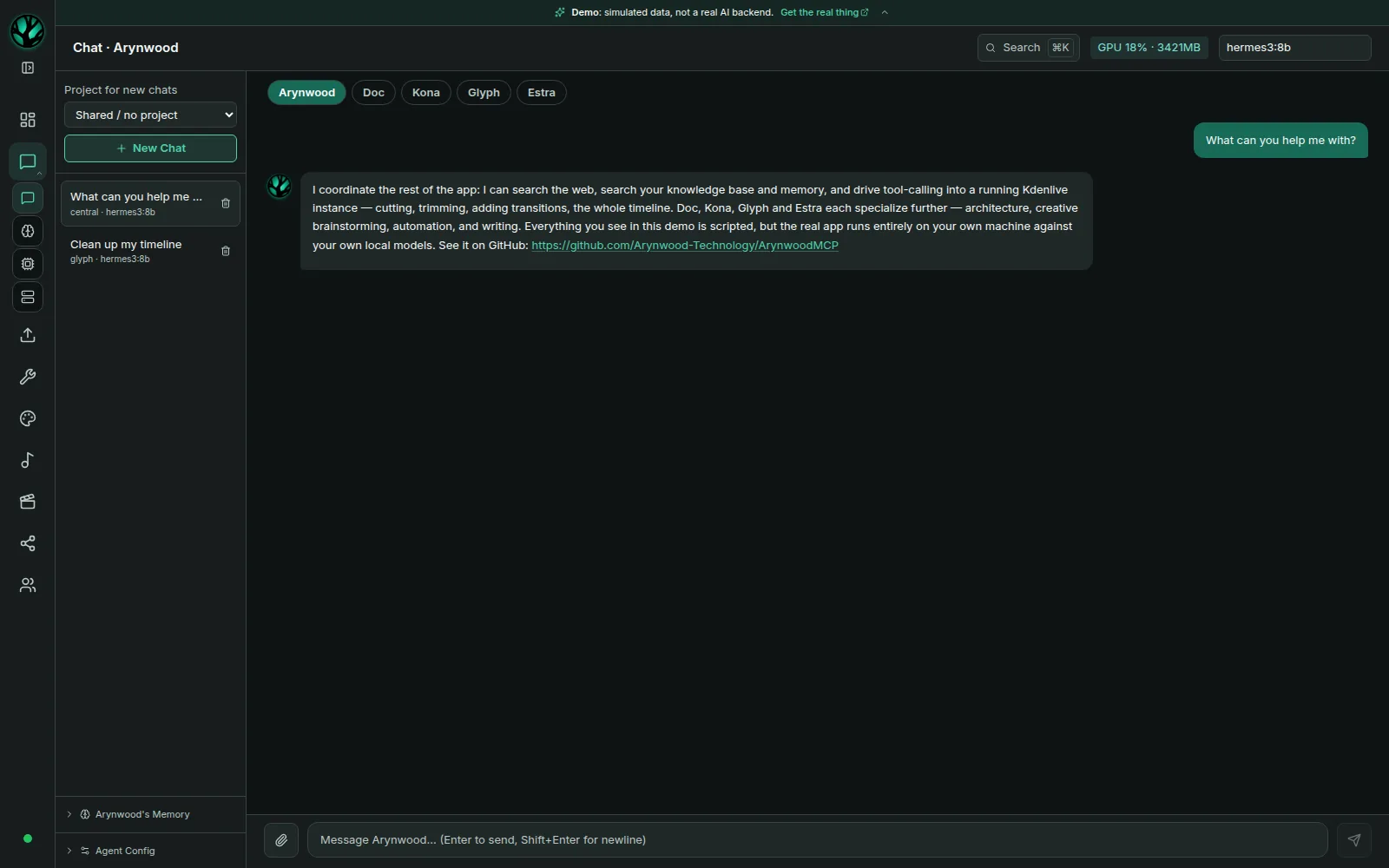
Before you install
This is alpha software. Choose a small starting workflow, check the requirements, and expand from there.
01 · Baseline
Linux x86_64 or Windows x64, 16 GB RAM and at least 20 GB free disk are the documented baseline. Install Ollama and your models separately. CPU-only chat works; see measured speeds.
02 · Optional
Image generation and other GPU features need their own services and an NVIDIA GPU. The project recommends at least 12 GB VRAM for practical GPU use. Music tools need MusicStudio; knowledge search needs Qdrant.
03 · Limits
The Community page needs a Grove on 0.7.1 or later, installed separately. LoRA training, script-based GPU tools and the project file browser require a source checkout and are unavailable in the packaged app. The Windows installer is unsigned, and its GPU tools and integrations are not yet validated (Windows notes). macOS is unsupported.
Setup services
Paid work, scoped to your hardware and goals. Request a quote before any work begins.
Ollama, model selection and Arynwood MCP on Linux. A focused setup starts with one working chat workflow and a walkthrough of how to use it.
Connect a specific tool or creative service to your local AI workspace. Start with one task, such as a knowledge base or a Kdenlive workflow, and agree on the integrations and limits.
Diagnose an existing local AI installation: model loading, service connections or GPU setup. Define the problem and scope before making changes.
How it works
A fixed quote before anything starts, and a working result you know how to use.
Step 01
Your Linux distribution, CPU, RAM and GPU, and the one task you want local AI to help with. Not sure what hardware you have? Say so and I’ll tell you how to check.
Step 02
I reply with what is realistic on your hardware, what I’ll set up, what I won’t, and a fixed price. No work or charge until you agree.
Step 03
We work together remotely over a screen share. You finish with one working workflow, a walkthrough of how to use it, and short written notes for later.
Research, tutorials & guides
Explore our research and practical learning guides, with sources, methods and limits stated. Visit the research collection.
Security brief · MCP
Six security risks, exact-call approvals and hardening included in 0.5.5, with release status and limits stated.
Read the security briefTroubleshooting · Ollama
Read the PROCESSOR column in ollama ps, fix a CPU fallback on Linux, or force the CPU on purpose.
Read the answerMemory · 3B to 33B
Measured memory for each model size, how context length changes it, and what happens when a model doesn’t fit.
Read the answerGPU · RTX 3060 12GB
Speeds for eight models on the card, from 3B to 33B, and which one to pick.
Read the answerBenchmark · Agent decisions
Seven models on an agent’s routing decisions, planted instructions and decision speed, measured on an RTX 3060.
Read the benchmarkBenchmark · CPU only
CPU-only desktop and four-vCPU server speeds, an Ollama version comparison, and small-model tool tests.
Read the benchmarkBenchmark · Used laptop
The same used HP laptop on Windows 10 and Linux Mint 22.3: 9.4 against 12.9 tokens per second, CPU only.
Read the benchmarkSetup guide · v0.5.5
Hardware requirements, install steps and what the packaged alpha includes. Start with chat, then add knowledge search and creative tools.
Read the guideResearch · SDXL
Why a LoRA loads on any SDXL derivative but never on SD 1.5, with the training setup and limits. CC BY 4.0, with a DOI.
Read the studyThe Arynwood toolkit
Explore video editing software, Linux learning tools and community services for your next project, lesson or gathering.
Create · Video · Alpha
A video editor built on Kdenlive, with a local AI assistant for edits described in plain language. The Linux editor is available as a Flatpak; the assistant’s required tool server is not published yet.
Explore CutroomLearn · Linux
Search commands and explore Linux, Git, Docker and Ollama in an interactive reference. No connected shell.
Open the hubListen · Music
Tune a genre, search for a track and listen while you work. Find the player on Arynwood Social.
Start listeningConnect · Community
Open the community chat in your browser. Share what you’re making and join the conversation.
Join the chatQuestions
Community, open knowledge and the tools that support your work.
Arynwood brings community, open knowledge and useful tools together. Start with Grove for shared spaces and planning, follow Open Knowledge for educational research, or explore the toolkit for creating and learning.
Arynwood Grove is invite-only community software for shared calendars, tasks, notes, files and discussion. Households, clubs and small teams can organize their plans on a server or computer they control.
Arynwood Open Knowledge is an open-source project in development for educational and special education research. It searches Crossref and OpenAlex, keeps source provenance and supports a local knowledge bank with citation export. It has not been released yet.
Teacher planning groups and event teams can use Grove’s shared calendars, tasks, files and discussion to organize their work. Open Knowledge is being built for educational research. Explore the tools for creative projects and learning resources.
Arynwood Technology is the software studio of Lorelei Noble, a software engineer. Our local AI guides link to measured results, hardware and software versions, and raw data. Read how we test for the method, disclosures and corrections process.
A desktop app for Linux and Windows that brings Ollama chat, knowledge search, design and optional creative services into one workspace. “All in one” describes the interface: it does not mean models and every service are bundled.
Yes, as an alpha. Version 0.5.5 includes a Windows x64 installer alongside the Linux AppImage and .deb. The installer is unsigned, and the optional GPU tools, Kdenlive and MusicStudio integrations have not been validated on Windows yet. Ollama is installed separately on both systems. Read the Windows setup notes.
Yes. The browser demo runs the real interface with scripted conversations. It is not a live AI; features that need a GPU or backend say so.
MCP stands for Model Context Protocol, a way for AI applications to connect to tools. Arynwood MCP is the desktop application’s name; its external tool integrations need their own servers and configuration.
Yes, local Ollama chat can run on your machine without a cloud API key or subscription. You still need to install and download models. Optional remote providers and publishing platforms have their own accounts, terms and costs.
Local models run on your hardware. Downloads, web search, remote endpoints and social publishing use the network. Check which services you enable; local-first does not mean every workflow is offline.
Chat can run on a CPU through Ollama. On the eight-core desktop, Llama 3.2 3B generated 12.8 tokens/s. On the four-vCPU web server it generated 2.8 with Ollama 0.15.2 and 2.5 with 0.35.1; see the full CPU benchmark. GPU generation features have separate NVIDIA requirements.
You’re welcome here
Tell me about your community, what you teach or the questions you’re exploring. Whether you’re bringing a group together in Grove, following Open Knowledge or looking for help with a tool, I’d love to hear what would make a difference for you.
Or write directly to lorelei@arynwood.com. Replies within two business days.
Join the Linux Local AI Community on Facebook to compare setups with other people running AI on Linux.
Follow on Facebook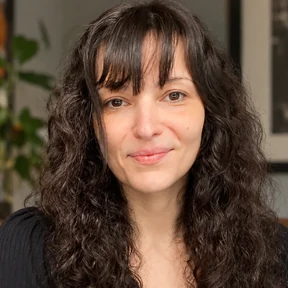
Hi, I’m Lorelei Noble, the creator of Arynwood.
My goal is to build a community around technology, with safety and care at its heart: a place to share knowledge, organize tools and resources, and connect with others through secure messaging.
I want to create tools that help us work in harmony, making room for creativity, ethical choices, and exploration.