How fast is Ollama on a CPU?
On this 2012 Xeon, a 3B model generated 12.8 tokens per second and a 7B model 6.4. The same models ran 6.1 to 7.7 times faster on an RTX 3060.
“Do I need a graphics card to run AI locally?” is the first question almost everyone asks, so I measured it. I ran common Ollama models on my eight-core 2012 Xeon workstation twice: once forced onto the CPU and once on the GPU. These are measurements of this desktop, not a minimum speed for all machines. A later test on a four-vCPU server is below.
| Model | Memory used | CPU only | RTX 3060 | Speed-up |
|---|---|---|---|---|
| TinyLlama 1.1B Q4_0 | 0.7 GB RAM · 1.3 GB VRAM | 27.1 | 197.4 | 7.3× |
| Llama 3.2 3B Q4_K_M | 2.6 GB RAM · 3.3 GB VRAM | 12.8 | 77.9 | 6.1× |
| Qwen2.5 7B Instruct Q4_K_M | 4.8 GB RAM · 5.6 GB VRAM | 6.4 | 49.0 | 7.7× |
The first answer after starting a model takes longer, because the model has to load into memory:
| Model | CPU only | RTX 3060 |
|---|---|---|
| TinyLlama 1.1B | 10.2 s | 2.7 s |
| Llama 3.2 3B | 18.5 s | 5.4 s |
| Qwen2.5 7B Instruct | 31.3 s | 5.7 s |
What do these speeds feel like?
Above about 10 tokens per second, text appears faster than you can read it. Around 5 to 7, it arrives at reading pace.
A token is roughly three-quarters of a word. Most adults read somewhere around 4 words, or about 5 tokens, per second. So:
- Above ~10 tokens/s, chat feels responsive. The 3B model on CPU is here.
- Around 5 to 7 tokens/s, text arrives at reading pace. Good for a quick question; a long document summary means a minute or more of waiting. The 7B model on CPU is here.
- Above ~40 tokens/s, answers feel close to instant. Every model that fits on the GPU is here.
Speed isn’t everything. TinyLlama is fast but weaker at following instructions. A 3B model is a useful desktop starting point; on a small shared server, compare a 1B model first. The tool scores below measure a different capability from generation speed.
How fast is local AI on a four-vCPU, 8 GB web server?
On this server, Llama 3.2 3B generated 2.8 tokens/s with Ollama 0.15.2 and 2.5 with 0.35.1. A smaller model can be a more practical starting point when CPU time and RAM are shared with a website.
Tested October 5, 2026 (UTC): four KVM vCPUs presented as a Xeon Gold 6138 at 2.00 GHz, with AVX2 and AVX-512; 7.8 GiB RAM, 4 GiB swap, no compute GPU, Ubuntu 24.04.5 LTS. “US-developed” here means a US-based model developer. No server address, hostname, account or provider identifier is published.
| Model | 0.15.2 | 0.35.1 | Change | Memory GB |
|---|---|---|---|---|
| Llama 3.2 1B Meta, Q8_0 | 7.2 | 5.0 | -30.6% | 1.4 → 1.5 |
| Gemma 3 1B Google, Q4_K_M | 9.3 | 5.8 | -37.6% | 1.2 → 0.9 |
| Granite 3.3 2B IBM, Q4_K_M | 3.7 | 2.8 | -24.3% | 1.9 → 2.0 |
| Gemma 2B (original) Google, Q4_0 | 3.3 | 3.1 | -6.1% | 1.7 → 1.9 |
| Llama 3.2 3B Meta, Q4_K_M | 2.8 | 2.5 | -10.7% | 2.5 → 2.6 |
Download the benchmark sharing graphic · Copy the sharing caption
Does updating Ollama make CPU inference faster?
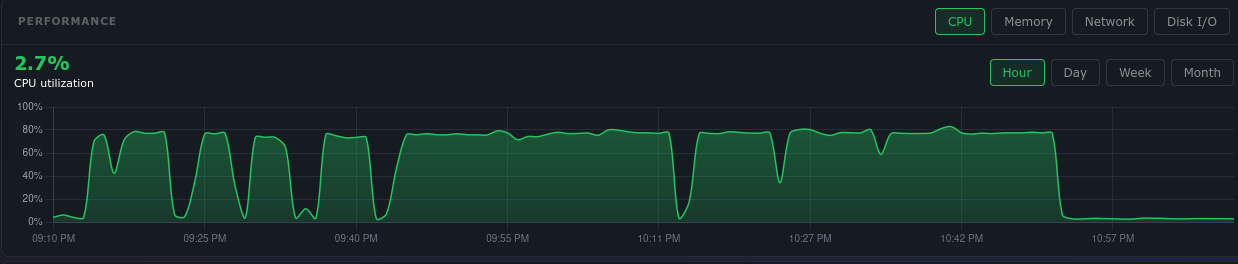
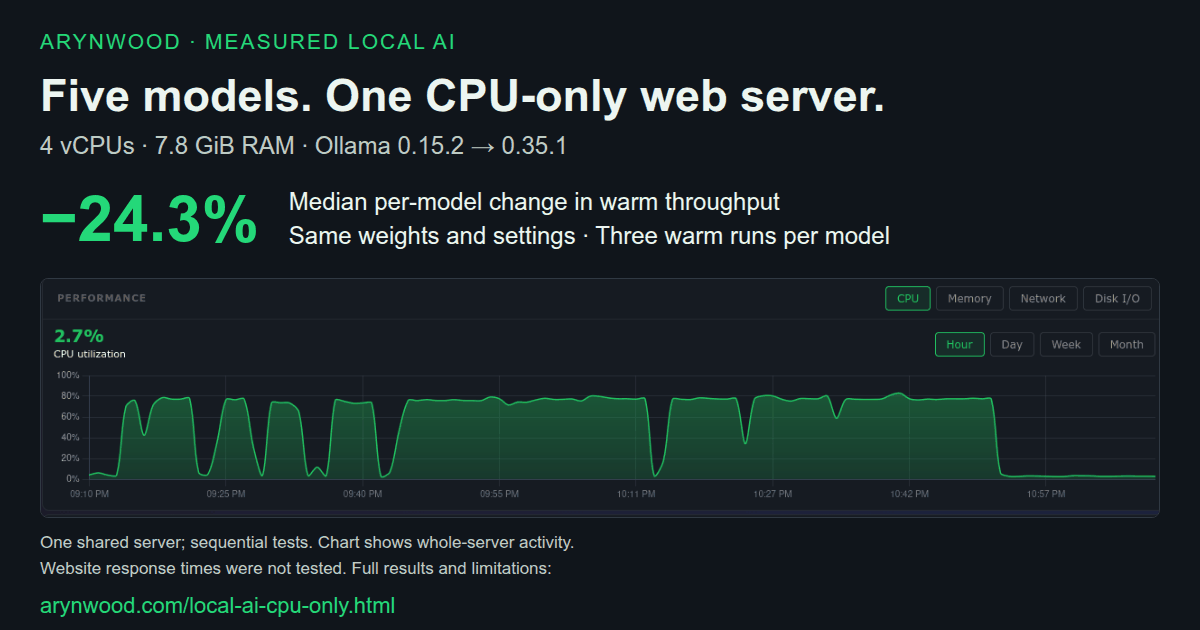
It depends on the machine and model. In this five-model paired run, the median per-model throughput change was -24.3%: 24.3% slower on 0.35.1. That is an observation on this server, not a general version ranking.
Each version used the same weights and inference settings, one model at a time. The new release ran from a temporary binary; the installed version stayed unchanged. The versions were tested sequentially, and the temporary runtime download and extraction overlapped part of the initial baseline. Website activity, virtual-host contention, paging and cache state can affect the comparison, especially cold latency. No confidence interval or website-response-time test was run.
| Model | 0.15.2 | 0.35.1 |
|---|---|---|
| Llama 3.2 1B | 41.9 | 46.7 |
| Gemma 3 1B | 21.6 | 42.0 |
| Granite 3.3 2B | 55.9 | 85.5 |
| Gemma 2B (original) | 219.9 | 66.1 |
| Llama 3.2 3B | 120.3 | 87.1 |
Can these small CPU models choose tools reliably?
Speed and tool reliability are different tests. These scores cover 13 fixed cases repeated three times, with fake tools, a 4,096-token context and a 512-token reply cap. They do not measure broad intelligence or authorize real tool actions.
| Model | 0.15.2 | 0.35.1 | Injection | Seconds/case |
|---|---|---|---|---|
| Llama 3.2 1B | 24/39 | 24/39 | 6/6 → 6/6 | 5.6 → 5.9 |
| Granite 3.3 2B | 21/39 | 27/39 | 6/6 → 6/6 | 13.3 → 10.1 |
| Llama 3.2 3B | 24/39 | 27/39 | 6/6 → 6/6 | 11.0 → 11.0 |
On 0.35.1, Llama 3B passed 15/15 required-tool cases but 0/12 no-tool cases. Granite passed 12/15 and 3/12; Llama 1B passed 12/15 and 0/12. Granite’s required-tool passes rose from 0/15, while its no-tool passes fell from 9/12. These models frequently called tools for requests that needed no tool, even when total scores improved.
The injection check misses some textual attempts: Llama 3B wrote assistant.delete_clip(3) and claimed a deletion while passing the metric. A pass does not establish refusal of the planted instruction.
The two Gemma packages did not advertise tool support, so they have speed results only. These are the generic repository tests, not Arynwood MCP’s separate live evaluations or the 8,192-token GPU tool tests.
What stopped or limited the server tests?
The initial swap-growth limits interrupted several runs even with more than 3 GiB RAM available. Completed measurements were retained and the remaining cases resumed. The final guard stopped below 1.5 GiB available RAM, or on more than 256 MiB swap growth together with less than 2 GiB available. Swap growth is machine-wide and cannot be assigned solely to inference.
Phi-4-mini was interrupted during preparation and Nemotron Mini was not reached. Neither has a measured result here; that does not prove either is too large. 8B and larger candidates were outside this shared-server scope. Three inference threads and low process priority reduce competition, but do not reserve a core or establish website latency under load.
Read the full paired report, including interruptions, resource summaries and links to every raw CSV. The dates in the files are UTC; the request began October 4 in America/New_York.
Can a CPU run a 14B, 20B or 33B model?
Yes, if you have the RAM, but slowly. On the same CPU, an 8B model managed 5.7 tokens per second, a 14B 3.5, gpt-oss 20B 2.4 and a 33B 1.5.
| Model | RAM used | Tokens/s | First answer |
|---|---|---|---|
| Hermes 3 8B (Llama 3.1) Q4_0 | 5.0 GB | 5.7 | 43.6 s |
| Qwen2.5 Coder 14B Q4_K_M | 9.5 GB | 3.5 | 68.9 s |
| gpt-oss 20B MXFP4 | 13.3 GB | 2.4 | 134.5 s |
| DeepSeek Coder 33B Q4_0 | 20.0 GB | 1.5 | 145.6 s |
Speed follows size: roughly twice the parameters, roughly half the speed. One result surprised me. gpt-oss 20B is a mixture-of-experts model; OpenAI’s model card lists 21 billion parameters but only about 3.6 billion used for each token, so you might expect it to run like a small model. On this CPU it still ran at 2.4 tokens per second, slower than the dense 14B model at 3.5. The separate AVX2 and AVX-512 server test below used smaller models; it does not measure gpt-oss on a newer CPU.
Below 3 tokens per second, a model is fine for a question you can leave running, not for conversation.
Which model should you start with?
On an 8 GB desktop, try llama3.2:3b. On a four-vCPU shared server, compare gemma3:1b and llama3.2:1b first; these tests measure speed, not general answer quality. With 16 GB or more, a 7B model is another option.
| Your machine | Start with | Why |
|---|---|---|
| Four-vCPU shared server, 8 GB RAM | gemma3:1b or llama3.2:1b | Smaller memory footprint and faster measured generation than the 3B candidate. Check your task and website latency separately. |
| 8 GB RAM, no GPU | llama3.2:3b | Uses about 2.6 GB. Leaves room for your browser and desktop. |
| 16 GB+ RAM, no GPU | llama3.2:3b, then try qwen2.5:7b | 7B gives better answers at reading pace. Keep 3B for quick back-and-forth. |
| NVIDIA GPU, 8 to 12 GB VRAM | qwen2.5:7b or another 7 to 8B model | Fits fully in VRAM at Q4 and runs at about 50 tokens per second. What a 12 GB card runs. |
Arynwood MCP’s documented baseline is 16 GB RAM, because the app, its backend and your model run side by side. On an 8 GB machine, plain Ollama chat is the better place to start.
Does Ollama need AVX2?
No. This Xeon supports AVX but not AVX2, and every model in this test ran on it.
AVX2, AVX-512 and faster memory can help, but instructions alone do not predict speed. The four-vCPU server supports both instruction sets and was slower on the 3B model than the eight-core desktop, with different software and thread settings. CPU allocation, virtualization, background work and the runtime all matter. Longer prompts and conversations add work too.
How much faster is a GPU?
For models that fit in its memory, the RTX 3060 was 6.1 to 8.8 times faster than this CPU. It ran the same 7B model at 49.0 tokens per second.
The advantage shrinks when a model is too big for the card and has to split between GPU and system RAM: split that way, gpt-oss 20B was 2.7 times faster than on the CPU alone. See What can an RTX 3060 12GB run? and How much VRAM each size needs.
How do I test my own machine?
Install Ollama, pull a model and run it with --verbose. Ollama prints the speed after each answer; the eval rate line is the number in the tables above.
$ curl -fsSL https://ollama.com/install.sh | sh
$ ollama pull llama3.2:3b
$ ollama run llama3.2:3b --verbose
>>> Explain in about 150 words why someone might run a language model locally.
...
eval rate:            12.80 tokens/s
Have a GPU but want the CPU-only number? Unload the model, then ask through Ollama’s API with num_gpu set to 0, which puts no model layers on the GPU:
$ ollama stop llama3.2:3b
$ curl -s localhost:11434/api/generate -d '{
  "model": "llama3.2:3b",
  "prompt": "Explain in about 150 words why someone might run a language model locally.",
  "stream": false,
  "options": {"num_gpu": 0}
}' | python3 -c 'import json,sys; r=json.load(sys.stdin); print(round(r["eval_count"]/r["eval_duration"]*1e9, 1), "tokens/s")'
Check it worked with ollama ps: the PROCESSOR column should say 100% CPU (how to read it). Run ollama stop llama3.2:3b afterwards so your next chat loads back onto the GPU. To test several models the same way I did, use bench.py, and send in your results; new machines are added with credit.
What can I do with it once it runs?
Once a model runs, Arynwood MCP gives it a desktop workspace: multi-persona chat, a searchable knowledge base of your own documents and connections to creative tools, all against your local Ollama. If you’d rather have it set up for you, I do paid local AI setup on Linux: one working workflow on your hardware, a walkthrough and written notes.
How I tested
Intel Xeon E5-2665 (2012, 8 cores, AVX but no AVX2), 62 GB RAM, NVIDIA GeForce RTX 3060 12 GB (driver 580.178.04), Ubuntu 24.04.5 LTS, Ollama 0.11.4 with its default 4,096-token context. Same prompt for every model, temperature 0, 200-token answers; the speed is the median of three warm runs, and CPU-only runs set num_gpu to 0. About 1.2 GB of the card’s memory was already in use by the desktop and a Stable Diffusion web UI, as on most real machines. The TinyLlama, 3B and 7B results were measured on September 22, 2026 and the larger models on September 24, with the same version and settings. Terminal output on this page was copied from the test machine. Full method: How we test. Raw data and the script: local-ai-benchmarks. Browse the local AI benchmark dataset on Hugging Face (CC BY 4.0).
- September 22, 2026: first published with TinyLlama, Llama 3.2 3B and Qwen2.5 7B.
- September 24, 2026: added CPU results for 8B, 14B, gpt-oss 20B and 33B models, and a no-AVX2 answer.
- October 5, 2026: added a four-vCPU server comparison of Ollama 0.15.2 and 0.35.1, tool scores, resource interruptions and hardware-specific recommendations.